How to Know What Voltage TV Backlight LED Strips Need

Time:2026-09-30 Author:Henry
0%

Choosing a replacement strip begins with one practical question: what voltage do the tv backlight led strip require require? The answer is rarely printed as one simple number. Different televisions use LED strips with different series layouts, current limits, and driver designs. A strip may look identical while requiring a different electrical supply. That small difference can destroy new LEDs within seconds.

Homer L. Davidson, a longtime television repair author, advises, “Never substitute parts without checking the circuit.” His point remains useful today. Technicians should inspect the original strip, read its markings, and compare the television’s service data. A multimeter can reveal important clues, but resistance readings alone cannot confirm the correct operating voltage. The LED driver’s output, total LED count, and series arrangement must also be considered. Some strips operate from several dozen volts, not ordinary 12-volt adapters. Others use constant-current drivers, making voltage measurements change during operation.

This guide explains how to identify the required voltage safely and accurately. It covers strip labels, driver boards, LED testing, and model-specific replacement checks. A cautious repairer measures before ordering. It is tempting to trust a marketplace listing. That choice can be costly. Even experienced technicians sometimes overlook a single LED configuration change. The more reliable approach combines visual inspection, technical documentation, and controlled testing. Do not force power onto an uncertain strip. A correct replacement should match voltage, current, connector position, polarity, and physical length. Voltage matters, but it is not the only requirement.
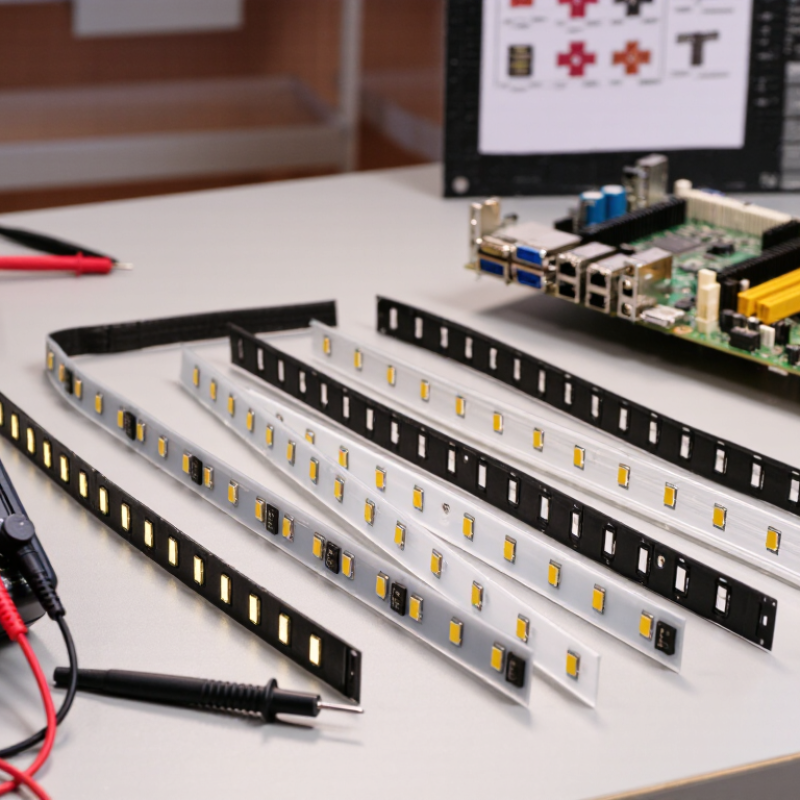
How to Know What Voltage TV Backlight LED Strips Need

Identify the TV Backlight LED Strip Type and Layout

Identify the strip type before estimating its voltage. Remove the rear cover only after unplugging the television and allowing time for stored charge to dissipate. Photograph the wiring and note each strip’s printed code, connector position, and LED count. These details help distinguish single-row strips from multi-row layouts and reveal how the LEDs may be connected. A layout with several strips can use series strings, parallel branches, or a combination of both.

Count the LEDs on one strip, then compare that count and its markings with the service information for the exact television model. In a series string, LED forward voltages add together, so a strip with more LEDs may need a higher output. Parallel branches change the current requirements too. Do not infer the required voltage from the television’s screen size or from connector shape alone. They can mislead. I have seen replacement strips look nearly identical while using a different LED arrangement; that small mismatch matters.

Tips: Check for labels near the power board, such as LED+ and LED−, and record any stated output range. Use the correct service documentation rather than guessing from a generic online chart. If testing is necessary, use suitable insulated equipment and avoid touching exposed circuitry. One detail can be easy to miss: some strips split into sections, so count the electrical string, not just the visible LEDs.

How to Know What Voltage TV Backlight LED Strips Need

Identify the strip type and layout: the estimates below use about 3 V per white LED connected in series.

These are illustrative LED-string forward-voltage estimates, not a universal TV supply voltage. Actual requirements vary by LED and circuit design. Check the strip markings, wiring layout, and service documentation before selecting or testing a replacement.

Check the Original Strip’s Voltage Markings and Specifications

How to Know What Voltage TV Backlight LED Strips Need

Check the Original Strip’s Voltage Markings and Specifications

Start with the markings printed on the original strip, not a guess based on the television’s size. Look near the connector and along the flexible circuit for labels such as “3 V,” “6 V,” or a part number. A phone camera can help capture faint text before you remove the strip. Check the television’s service manual or parts list for the same strip number and its rated voltage. Match the connector and LED layout, too. A correct voltage alone does not guarantee a compatible replacement.

If the markings are missing, inspect the power board and wiring diagram. Some sets drive several LED segments in series, so the strip voltage may differ from the board’s output label. Do not treat that label as a direct strip specification. IEC 62368-1:2018 covers safety requirements for audio and video equipment, but it does not provide a universal TV backlight voltage. That distinction matters: there is no single voltage standard for every television. A multimeter reading can also mislead when the driver pulses or raises output under load. I’ve seen this step rushed; it is easy to overlook one small marking. Verify the exact model and strip part number before ordering.

Measure the LED Strip Voltage with a Multimeter

How to Know What Voltage TV Backlight LED Strips Need

Measure the LED Strip Voltage with a Multimeter

Unplug the television before opening its case. Backlight circuits can retain hazardous voltage, so never probe an energized strip unless you are trained to work on live electronics. Remove the strip or disconnect it from the driver, then set your multimeter to diode mode. Touch the probes to one LED, observing polarity. A healthy single LED may glow faintly, but a reading alone does not reveal the full strip’s rated voltage. Check the strip’s printed markings and count its LEDs.

For a powered measurement, use the driver’s output specifications and an insulated probe setup; do not guess based on screen size. LED packages may be arranged in series, where forward voltages add, or in parallel, where current distribution matters. The U.S. Department of Energy’s 2022 Solid-State Lighting R&D Opportunities report notes that LED performance depends on operating conditions, reinforcing why a generic voltage estimate can mislead. A multimeter’s reading also has limits: NIST Technical Note 1297 explains that measurement uncertainty must be considered, not ignored. Small detail. Record the meter range, probe points, and whether the strip was connected. If the displayed voltage jumps, the driver may be pulsing, or your probe contact may be poor. Recheck carefully.

Match the Replacement Strip to the TV’s Power System

How to Know What Voltage TV Backlight LED Strips Need

Match the replacement strip to the TV’s power system, not just its physical size. The backlight driver supplies a specific electrical range, and the strip’s LED count and wiring affect its operating voltage. A strip that fits the panel can still be electrically wrong. Check the original strip’s part number and markings, then compare them with the TV’s service information or the power board’s LED-output label. Connector shape alone proves very little.

If the original markings are missing, identify the exact TV model and panel revision before ordering. Sets with similar screen sizes may use different strips or driver circuits. Avoid guessing from the number of LEDs: strings can be wired differently, changing the voltage they require. Unplug the TV before opening it; internal power components can retain charge. I have seen a nearly identical-looking strip cause confusion. That detail matters.

Tips: Match the strip’s part number, LED count, connector, and polarity where specified. Prefer a replacement listed for the exact panel or TV revision. Do not connect a strip to a guessed voltage or test exposed circuitry while powered. If the driver label and replacement specifications do not agree, pause and consult a qualified repair technician. A little uncertainty here is worth taking seriously.

Confirm Voltage Compatibility Before Installing the New Strips

How to Know What Voltage TV Backlight LED Strips Need

Confirm Voltage Compatibility Before Installing the New Strips

A replacement strip can fit the panel and still be electrically incompatible. Before removing the old backlights, check the TV’s service documentation and the markings on the original strips. Record the part number, connector layout, and specified voltage. A label on the power board may show the backlight output, but it does not always reveal the voltage required by each strip. Those figures are not necessarily interchangeable.

Look closely. LED strips may be wired in series or parallel, and the driver can regulate current rather than supply one fixed voltage. Compare the replacement’s electrical specifications and LED arrangement with the original, not just its length or plug. If the documentation is unclear, measure only with suitable equipment and follow the service procedure; live circuits can be hazardous. A multimeter reading taken without understanding the driver may mislead you.

Do not guess. Applying the wrong supply can damage LEDs or the backlight driver, even if the screen briefly lights up. I’ve seen a visually identical strip fail because its LED count differed. That check takes time, but skipping it costs more. If the voltage or wiring remains uncertain, pause and ask a qualified repair technician to verify compatibility before installation.

How to Know What Voltage TV Backlight LED Strips Need - Confirm Voltage Compatibility Before Installing the New Strips

Check What to look for How to interpret it Recommended action
Original strip label Printed voltage, part number, LED count, polarity marks, and connector layout. A printed voltage is useful evidence, but some strips identify only a part number or electrical configuration. Match the replacement to the original part number and physical configuration where possible; verify voltage separately.
TV and power-board model numbers The complete TV model and the backlight driver or power-board part number. The same TV model family can have different panel or backlight revisions. Use model and board numbers to identify the correct service documentation and compatible strip set.
Driver output specifications Output voltage range, output current, number of channels, and whether the output is constant-current. Many TV backlight drivers regulate current; their output voltage changes with the LED string load and is not necessarily a fixed strip voltage. Compare the strip configuration with the documented driver range and current—not just a single voltage figure.
LED count and circuit layout Number of LEDs per series string, parallel branches, and arrangement of the connectors. More LEDs in series generally require a higher string voltage; the exact requirement depends on LED type and circuit design. Choose a replacement with the same string and connector configuration; do not assume that a similar-looking strip is electrically equivalent.
Connector and polarity Pin count, connector orientation, pin assignment, and positive/negative markings. A connector that fits physically may still have a different pinout or polarity. Confirm the pinout against the original strip or service information before connecting power.
Voltage measurement A measurement taken with suitable equipment and according to the service procedure. An unloaded or open-circuit driver reading may differ from its operating voltage and can be misleading. Do not use a single unloaded reading as the sole basis for selecting strips. Have live testing performed by a qualified technician.
Replacement listing claims Supported TV or panel models, strip part numbers, LED count, and stated electrical specifications. A voltage claim alone does not establish compatibility if the current, wiring, or panel revision differs. Check all available identifiers and confirm the replacement is intended for the exact panel or strip set.
Safe installation TV unplugged, stored charge handled safely, and the LCD panel supported without twisting or pressure. TV power boards can contain hazardous voltages, and LCD panels are fragile. Disconnect power before servicing. If you are not trained to work on electronics, use a qualified repair technician.

Key rule: TV backlight strips do not have one universal voltage. Confirm the exact strip configuration and driver specifications before installation.

FAQS

Why can’t TV backlight voltage be guessed from screen size?

Screen size gives no reliable voltage value. Similar-sized televisions may use different LED counts, layouts, and driver circuits.

What should I check before estimating strip voltage?

Photograph the wiring and record the strip code, connector position, polarity, and LED count. Small markings matter.

How does LED wiring affect required voltage?

LEDs connected in series add their forward voltages. Parallel branches change the current demand instead.

Can connector shape confirm a replacement strip is correct?

No. A matching connector does not prove electrical compatibility. Check the part number, LED layout, polarity, and panel revision.

Where can voltage information appear on the original strip?

Look near the connector and along the flexible circuit. Markings may show values such as “3 V” or “6 V.”

What if the original strip has no readable markings?

Check the power board, wiring diagram, service information, and exact television model. Do not rely on a generic chart.

Can a multimeter provide the exact backlight voltage?

Not always. Pulsed drivers or unloaded circuits can produce misleading readings. Treat one measurement cautiously.

What safety steps are needed before inspecting the backlight?

Unplug the television and allow stored charge to dissipate. Use insulated equipment and avoid exposed circuitry.

What should I do when the driver label and replacement specifications disagree?

Pause the repair and verify the strip information. Guessing may damage the backlight or driver. I would not rush this step.

Conclusion

Determining what voltage do the tv backlight led strip require require starts with identifying the strip type and layout used in the television. Check the original strips for printed voltage markings, part details, or specifications, and compare this information with the TV’s power system. A multimeter can also help assess the voltage supplied to the strips, but measurements should be taken carefully and interpreted in the context of the circuit.

When choosing replacements, match the strip configuration and electrical requirements rather than relying on appearance alone. Before installation, confirm that the replacement strips are compatible with the TV’s power supply and connections. Checking markings, specifications, and measurements together can help prevent voltage mismatches and support reliable backlight operation.


Henry

Henry

Henry is a dedicated marketing professional with a profound expertise in the company's offerings. With years of experience in the industry, he possesses an impressive understanding of the market dynamics and consumer behaviors that drive success. Henry is committed to sharing his insights through......