How to Test TV LED Backlight Strips Step by Step

Time:2026-10-15 Author:Aria
0%

Learning how to test tv led backlight strips can save time, money, and unnecessary panel damage. A dark screen with working sound often suggests a backlight problem, but the strips are not always responsible. Power boards, connectors, driver circuits, and damaged panels can create similar symptoms. Accurate testing requires patience, suitable tools, and a clear diagnostic process.

Begin with the television unplugged from the wall. Allow time for stored voltage to dissipate. Remove the rear cover carefully, because fragile clips and flat cables can break easily. A digital multimeter, LED backlight tester, insulated probes, and a bright workbench are useful. The exact test voltage depends on the strip design, so consult the television’s service information when available. Guessing can destroy good LEDs.

Look for darkened lenses, loose connectors, overheated areas, or cracked solder joints. Then test the strips individually, rather than relying only on a resistance reading. Some LEDs may pass a basic continuity check but fail when they warm up. That detail is easy to miss. Use controlled voltage and stop immediately if current rises unexpectedly. Never bypass protective circuits as a shortcut.

Real repair work is rarely perfect. A television may show one failed LED, while several others have weakened. Replacing only one strip can produce uneven brightness or another failure soon afterward. Photograph each connector before removal, and record every measurement. This simple habit prevents confusing mistakes. The safest result comes from comparing test findings with the manufacturer’s specifications, not from replacing parts based on appearance alone.
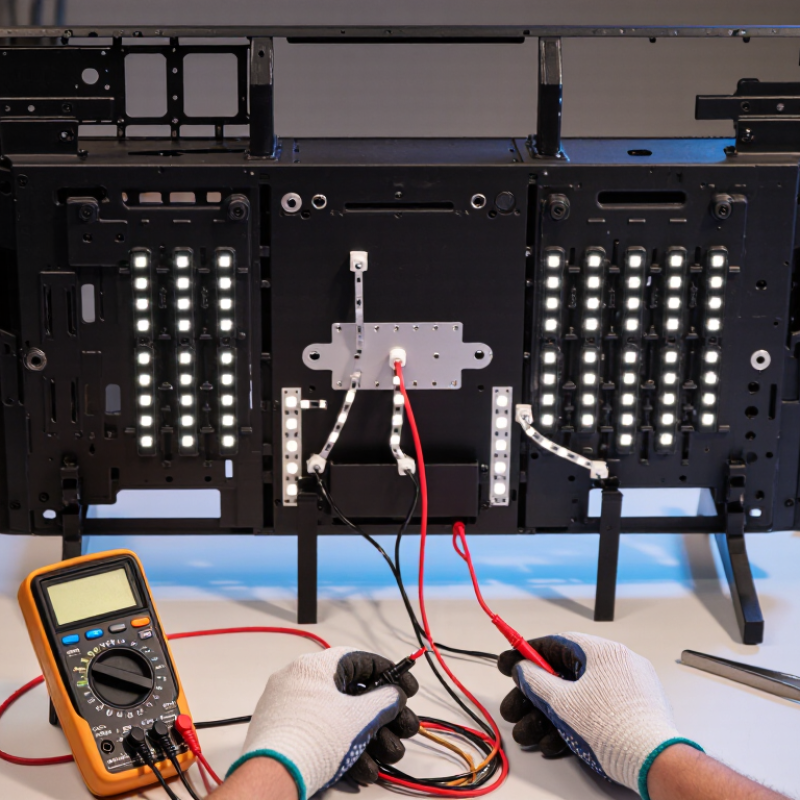
How to Test TV LED Backlight Strips Step by Step

Safety Precautions Before Testing TV LED Backlight Strips

How to Test TV LED Backlight Strips Step by Step

Before opening a television, unplug it from the wall and remove every connected cable. Wait several minutes, but do not assume the capacitors are safe. Internal power boards may retain dangerous voltage after shutdown.

The U.S. Bureau of Labor Statistics recorded 126 fatal occupational injuries involving electrical current in 2023.

This figure supports a simple rule: treat every exposed circuit as energized until verified otherwise.

Work on a dry, non-metallic table with bright lighting. Wear safety glasses and use insulated tools rated for electrical work. Photograph cable positions before removing the rear cover.

The panel is thin and easily cracked. It is also surprisingly sharp around its metal frame. I have found that rushing this stage causes more damage than the original fault.

Use a properly rated multimeter or LED backlight tester. Confirm the tester’s leads and range before touching the strip. Never probe powered circuits with damaged insulation.

Keep one hand away from the chassis when live testing is unavoidable, and stop if you are not trained for energized work. Follow the isolation principles in NFPA 70E and the protective requirements of IEC 62368-1.

A strip can look harmless. It is not.

Disconnect power again before moving connectors, removing lenses, or replacing LEDs. Rechecking may feel excessive, yet one missed connection can turn a simple inspection into a serious electrical incident.

Tools and Equipment Needed for Backlight Testing

How to Test TV LED Backlight Strips Step by Step: Tools and Equipment Needed for Backlight Testing

Reliable backlight testing starts with controlled tools, not guesswork. Prepare a digital multimeter with diode mode, a current-limited LED backlight tester, insulated probes, and a low-voltage DC supply. Add an ESD mat, protective glasses, thin work gloves, a plastic pry tool, and a phone camera for connector records. A magnifying lamp helps reveal dark LED lenses, cracked solder joints, or heat marks. Unplug the television first, then allow capacitors to discharge. Never test exposed power sections casually.

Use the multimeter to check continuity and compare readings across each strip. A current-limited tester can illuminate individual LEDs without applying excessive voltage. Increase output slowly, while watching for uneven brightness, flickering, or a strip that draws no current. Keep probe tips steady. They slip easily. Record voltage and current beside each strip number. The Global E-waste Monitor 2024 reported 62 million tonnes of electronic waste in 2022, with only 22.3% formally collected and recycled. Careful diagnosis can prevent unnecessary panel replacement.

Do not trust one measurement completely. A strip may light on the bench but fail after warming. I learned this the hard way. Run a short thermal check, using an infrared thermometer, and compare temperatures between strips. The International Energy Agency reports that efficient lighting can significantly reduce electricity demand, but failed LEDs often create uneven power use and visible screen stress. Recheck connectors after testing, because oxidation or loose contacts can imitate LED failure.

How to Test TV LED Backlight Strips Step by Step - Tools and Equipment Needed for Backlight Testing
Step Test Stage Tools and Equipment Needed Recommended Setting or Method Expected Reading or Observation Interpretation Safety and Handling Notes
1 Confirm the symptom TV remote control, flashlight, notebook Turn the TV on and check whether audio is present. Shine a flashlight at an angle onto the screen. A faint menu or video image may be visible when the screen is dark. A faint image with normal audio commonly indicates a backlight problem, but it does not identify the failed strip or LED. Do not open the TV until it has been disconnected from the power outlet.
2 Disconnect and discharge Insulated screwdriver, ESD wrist strap, nonconductive work surface Unplug the TV and allow time for stored energy to dissipate. Follow the service procedure for the specific chassis. No power should be applied during continuity or diode testing. The TV is ready for low-voltage resistance and diode checks only after safe isolation. Power-supply capacitors can retain hazardous voltage. Avoid touching exposed primary-side components.
3 Remove the rear cover Screwdriver set, magnetic tray, camera or label tags Remove screws carefully, store them by location, and photograph connector positions before disconnecting cables. LED strip connectors and the LED driver output wiring become accessible. Correct identification of the LED+ and LED− terminals prevents incorrect test connections. Protect the LCD panel from bending, pressure, dust, and accidental impact.
4 Inspect connectors and wiring Bright inspection lamp, magnifying glass, soft brush Check LED connectors, solder joints, ribbon cables, harnesses, and areas showing heat discoloration. No loose pins, cracked solder joints, burnt insulation, corrosion, or visibly damaged connectors. A damaged connector or wire can imitate a failed LED strip and should be corrected before strip replacement. Do not pull wires by the cable. Release locking tabs before removing connectors.
5 Check for short circuits Digital multimeter Set the meter to resistance or continuity mode. Test LED+ to LED− with the TV unplugged and the LED connector isolated where practical. There should not be a sustained near-zero resistance reading across the complete LED circuit. A near-zero reading can indicate a shorted LED, damaged strip, or a parallel circuit path. Confirm with the strip disconnected from the driver. Never use resistance or continuity mode on a powered circuit.
6 Test individual LEDs with diode mode Digital multimeter with diode-test function Probe each accessible LED or test point using the correct polarity. Reverse the probes if no response is obtained. Many individual white LEDs show a forward-voltage reading or faint glow; a typical white LED may measure approximately 2.5–3.5 V. A consistent forward-voltage response suggests the LED junction is conducting. Some LEDs require more voltage than a basic meter can provide. A no-reading result is not conclusive unless the test method is suitable.
7 Identify open LEDs or open strips Digital multimeter, LED backlight tester or current-limited DC supply Test each strip separately. Increase voltage gradually with current limiting enabled; do not exceed the strip's rated test conditions. An open strip may show no current flow and no illumination. A working strip normally lights evenly when supplied within its rated range. No illumination may indicate an open LED, broken track, disconnected wire, or insufficient test voltage. Use a current-limited source. Excessive voltage or current can destroy LEDs immediately.
8 Measure strip voltage Digital multimeter, insulated probes Reconnect the LED driver only if the procedure permits. Measure DC voltage at the LED output while the TV attempts to start the backlight. Voltage varies by design. LED strings commonly operate at tens to several hundred volts DC, so the exact service value must come from the chassis documentation. High output voltage with no light can indicate an open LED string. Very low or absent output can indicate driver protection, wiring faults, or a driver problem. LED driver outputs may be hazardous. Use one-handed probing, insulated probes, and appropriate voltage-rated equipment.
9 Measure LED current Current-capable multimeter or DC clamp meter, service information Measure only in the correct series path and only when the test procedure specifies it. Compare the reading with the documented operating value. Current should be stable and reasonably balanced between parallel LED channels, if the design uses multiple channels. Zero current suggests an open circuit or disabled driver. Unusually high current can indicate shorted LEDs or incorrect regulation. Never place a multimeter in current mode directly across a voltage source; this can short the circuit and damage the meter.
10 Check for uneven illumination Current-limited LED tester, darkened room, camera Power each strip briefly at a controlled level and observe brightness, flicker, dark spots, and color differences. Healthy LEDs should illuminate consistently without intermittent sections, unusually bright points, or dark segments. Dark spots, flicker, or a brighter LED can indicate aging, thermal damage, or a partially shorted LED. Do not stare closely at high-brightness LEDs. Limit test time to prevent overheating.
11 Check the LED driver output Digital multimeter, oscilloscope if available, service documentation Check the driver's output voltage, enable signal, dimming signal, and protection behavior according to the circuit design. The driver should receive its enable command and produce a controlled output without repeatedly shutting down. A correctly connected and tested strip with no driver output may point to an LED driver, control, or power-supply fault rather than a strip fault. Use an oscilloscope only with suitable probes and isolation practices. Do not defeat protection circuits permanently.
12 Confirm the repair Replacement strip if required, torque-safe screwdriver, test checklist Reassemble carefully, reconnect every cable, power on the TV, and test brightness at low, medium, and high settings. Uniform illumination, stable brightness, no flicker, no shutdown, and normal picture operation. The backlight system is likely operating correctly when all strips illuminate evenly and remains stable during extended testing. Replace matched strips where possible. Ensure diffusers, reflectors, and panel layers are returned to their original positions.
Important Safety Note: LED backlight testing can involve hazardous DC voltages, fragile LCD panels, and stored energy in power-supply capacitors. Use insulated tools, appropriate personal protective equipment, current-limited test equipment, and the correct service documentation. If the required measurements exceed your training or equipment rating, stop and use a qualified technician.

How to Access and Remove the LED Backlight Strips

Accessing and removing TV LED backlight strips requires patience, clean hands, and a stable work surface. Unplug the television and wait several minutes before opening it. Place the screen face down on a padded, dust-free table. Remove the stand and rear cover, keeping screws in labeled containers. Screw lengths can differ.

Disconnect the speakers, control buttons, and display cables carefully. Do not pull wires by force. Release each connector by its plug or locking tab. Remove the metal frame around the panel, then lift the LCD panel with two people if possible. It is thin and bends easily. One wrong grip can leave permanent lines or cracks. Wear lint-free gloves, but avoid touching the panel surface.

Set the LCD panel vertically in a protected location. Remove the diffuser sheets in their exact order and mark one corner with removable tape. These layers may look identical, but their direction matters. Lift the reflector gently to expose the LED strips. Some strips use clips, while others use adhesive. Warm adhesive slightly if necessary, but never overheat the plastic. Disconnect the strip wiring before lifting it. I once skipped a quick photo and reversed a diffuser layer during reassembly. The picture looked uneven, and the mistake was frustrating. Photograph every stage instead. Check for burnt lenses, dark spots, loose connectors, and cracked solder joints before testing the strips with a suitable LED tester.

Step-by-Step Methods for Testing LED Strips and Individual LEDs

How to Test TV LED Backlight Strips Step by Step

Unplug the television and wait several minutes before opening the panel. Remove the rear cover carefully, then photograph every connector before disconnecting it. Inspect each strip under bright, angled light. Look for dark LED lenses, cracked solder joints, lifted copper pads, and brown heat marks. The U.S. Department of Energy’s 2024 Solid-State Lighting R&D Opportunities report notes that laboratory LED efficacy can exceed 200 lumens per watt, but heat still accelerates performance loss. A bright strip can still contain a weak LED.

Set a digital multimeter to diode mode and test each strip through its connector. A healthy series strip may show a brief glow or a forward-voltage reading. No reading suggests an open circuit; near-zero voltage may indicate a short. Use an LED backlight tester with current limiting when the multimeter cannot activate the strip. Never apply uncontrolled voltage. For an individual LED, remove the lens only when necessary, identify the anode and cathode, then probe both directions. It should emit a faint, even light in one direction. Swap the probes if nothing happens. My first mistake was trusting one voltage reading. I later found a cracked joint that passed a cold test but failed after warming. The IEC 62384 testing framework also emphasizes controlled current and temperature, so repeat doubtful tests after several minutes. Record readings, polarity, temperature, and visible brightness. Small differences matter.

How to Test TV LED Backlight Strips Step by Step

The chart shows typical forward-voltage readings for six white LEDs connected in series on a TV backlight strip. A healthy white LED commonly measures about 2.8–3.3 V when tested with a suitable LED tester. A significantly lower, unstable, or open reading may indicate a shorted or damaged LED.

Disconnect the television from mains power before testing. First inspect the strip for dark spots, cracked lenses, or burnt areas. Then test the strip connector for continuity, use an LED backlight tester with current limiting, and check each LED individually while observing correct polarity. Do not apply excessive voltage or current.

How to Interpret Test Results and Identify Faulty LEDs

How to Test TV LED Backlight Strips Step by Step

Disconnect the television and remove the rear cover before testing. Use an insulated multimeter and avoid touching exposed circuits. Check each strip visually first. Dark lenses, brown spots, cracked solder joints, or lifted connectors often reveal heat damage. In diode mode, test each LED across its marked terminals. A healthy LED usually shows a brief glow or a forward-voltage reading. A completely open reading suggests a failed LED or broken track. A near-zero reading may indicate a shorted LED.

Interpretation requires more than one measurement. Compare identical strips under the same test current. One strip that glows sharply brighter may contain shorted LEDs. A strip that stays dark may have an open LED, damaged wiring, or poor probe contact. Do not apply excessive voltage. A current-limited LED tester is safer and produces more consistent results. Measure the strip’s total voltage only within its rated range. I have found that a single weak LED can make the entire screen appear defective, which is easy to misdiagnose.

The U.S. Department of Energy reports that LED packages can exceed 50,000 hours under specified conditions, but television strips face different thermal and electrical stresses. The IEC 62717 framework also evaluates LED performance through lumen maintenance, not guaranteed failure-free operation. Therefore, a passing bench test does not prove long-term reliability. Recheck connectors, compare brightness across the full strip, and document readings before replacement. Sometimes the test method is the real fault.

FAQS

How should I prepare before testing LED strips?

Unplug the television and wait several minutes. Remove the rear cover carefully. Photograph every connector before disconnecting it. Keep screws in a small tray.

What visible damage should I look for?

Use bright, angled light. Check for dark lenses, cracked solder joints, lifted copper pads, and brown heat marks. Heat damage can hide beneath a bright surface.

How do I test a strip with a multimeter?

Set the multimeter to diode mode. Test through the strip connector. A healthy series strip may glow briefly or show forward voltage. No reading may indicate an open circuit.

What does a near-zero reading usually mean?

Near-zero voltage can suggest a shorted LED. A dark strip may also have broken wiring or poor probe contact. Check the connection again before deciding.

How can I test an individual LED?

Identify the anode and cathode. Touch the probes in one direction. The LED should emit faint, even light. Reverse the probes if nothing happens.

Is a backlight tester safer than applying external voltage?

A current-limited tester is safer and more consistent. Never apply uncontrolled voltage. Excessive current can damage a usable LED within seconds.

Why should I compare several identical strips?

Compare them under the same test current. One strip glowing much brighter may contain shorted LEDs. Record voltage, polarity, temperature, and brightness.

Can one weak LED make the whole screen look defective?

Yes. A single weak LED can make the entire screen appear faulty. That is easy to misdiagnose. Inspect every strip before replacing parts.

Why should I repeat a doubtful test?

Temperature can change the result. A cracked joint may pass a cold test but fail after warming. Recheck the strip after several minutes. My first reading was not enough.

Conclusion

Learning how to test tv led backlight strips requires careful preparation, patience, and attention to safety. Before opening a television, disconnect it from power and allow time for stored electrical energy to dissipate. Prepare suitable tools, such as a screwdriver set, insulated gloves, a multimeter, and an LED backlight tester. Work on a clean, flat surface, and handle the screen and internal panels gently to prevent damage.

After removing the rear cover and carefully lifting the display layers, inspect the LED strips for dark spots, cracks, loose connections, or burned areas. Test each strip with an LED tester, then use a multimeter to check individual LEDs when necessary. A strip that fails to light, shows uneven brightness, or has abnormal readings may contain a faulty LED or damaged connection. Compare results across all strips to identify inconsistencies, and replace damaged parts only after confirming the problem. Reassemble the television carefully and test its operation before completing the repair.


Aria

Aria

Aria is a dedicated marketing professional with a deep passion for innovative strategies and a keen understanding of our company's product offerings. With a wealth of experience in the industry, Aria excels at crafting engaging content that highlights the unique features and benefits of our......