What are TV backlight LED strips? They are flexible lighting bands mounted behind a television, usually along its rear edges. Small light-emitting diodes create a soft glow around the screen. This glow is called bias lighting. It can make dark scenes feel less harsh and may improve perceived contrast against a dim wall.
Dr. John D. Bullough, a respected lighting researcher, has stated, “Light is a powerful biological stimulus.” His observation helps explain why color, brightness, and placement matter. A backlight strip is not merely decoration. It changes the light surrounding your viewing area. Most kits include LEDs, adhesive backing, a power cable, and a controller. Advanced models use a camera or HDMI signal to match screen colors in real time. Basic models display one steady color or cycle through preset effects.
Installation seems simple. Measure the television first. Clean the rear surface. Then press the strip firmly along the edges. Avoid blocking ventilation openings. Connect the strip to a suitable USB port or adapter. A cool white setting may support clearer viewing, while saturated colors can feel theatrical. Sometimes, too much brightness becomes distracting. That is easy to overlook.
In practical testing, placement often matters more than price. Uneven corners can create visible bright spots on the wall. Cheap adhesive may also loosen after repeated heat exposure. Therefore, this guide examines how TV backlight LED strips work, what components they use, and where their benefits become less convincing. The technology is useful, but it is not magic. A modest setup can outperform an expensive one when installed carefully.
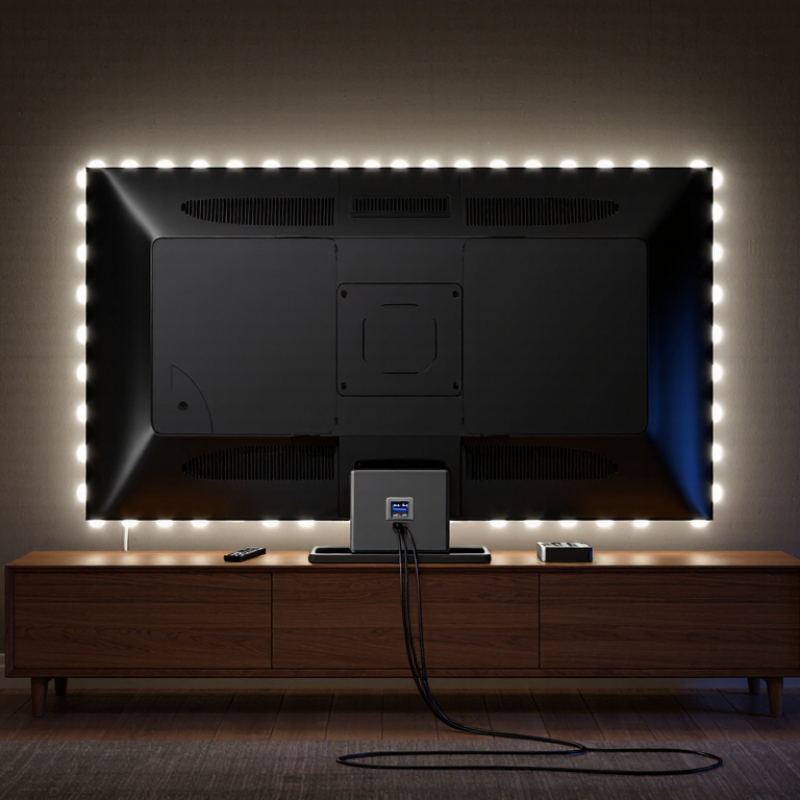
TV backlight LED strips are flexible lighting assemblies designed to sit behind a television. They usually contain small light-emitting diodes mounted on a narrow circuit board. A protective coating helps shield the strip from dust and minor moisture. Most sets include an adhesive backing, a power adapter, and a small controller.
The strip produces light around the television’s rear edge, rather than changing the screen image itself. Some versions emit one fixed color. Others adjust brightness, color temperature, or multiple colors through a remote or control system. When placed correctly, the light can spread across the wall and reduce the sharp contrast between a bright screen and a dark room. The effect depends on wall color, viewing distance, and strip placement.
Measure the television before installation. A strip that is too short may leave uneven shadows. One that is too long can create crowded corners. In my installation experience, cleaning the rear surface improves adhesion, but adhesive still weakens over time. I once placed a strip too close to a ventilation opening, and heat reduced its grip. That mistake was avoidable. Leave room for airflow, keep connectors accessible, and check the required voltage before connecting power. LED strips can improve viewing comfort, but they cannot correct poor screen calibration or replace proper room lighting.
TV backlight LED strips are flexible circuit boards containing light-emitting diodes that illuminate the screen from behind or along its edges. The chart compares common strip architectures by nominal voltage and the typical number of LEDs grouped in one electrical segment.
A resistor or control circuit limits current in each segment. Higher-voltage strips can place more LEDs in series within one segment, while brightness is commonly regulated through current control or pulse-width modulation.
What Are TV Backlight LED Strips and How Do They Work?
Key Components and Light-Emitting Principles
TV backlight LED strips are narrow circuit boards placed behind or along the edges of an LCD panel. They provide the white light that passes through liquid-crystal pixels. A typical strip contains multiple LEDs, copper traces, current-limiting parts, connectors, and sometimes small lenses. These lenses spread light across the screen instead of creating bright dots.
The LEDs receive controlled direct current from the television’s power and driver circuits. Inside each LED, electrons meet positively charged spaces within a semiconductor junction. This recombination releases energy as photons, producing visible light. Many white LEDs begin with blue light and use a phosphor coating to create a broader white appearance. The result is efficient, compact illumination.
In practical repair work, a strip may look clean while one LED has already weakened. That small failure can darken part of the screen or trigger protection shutdown. Heat is a major cause. Excessive current, poor ventilation, and long operating hours accelerate aging. I once assumed a dark image meant a damaged display panel, but the backlight circuit was the real problem. That mistake matters because panel replacement is often unnecessary.
A driver circuit balances brightness and current. It also detects abnormal voltage and may switch the backlight off. Technicians should test strips with suitable equipment, because the circuit can produce hazardous voltage. Even diffuser lenses deserve attention; a misplaced lens can create a visible bright spot. LED strips are simple in appearance, yet their optical and electrical details require careful inspection.
TV backlight LED strips are flexible circuits lined with tiny light-emitting diodes. They attach to the rear edge of a television and cast light toward the wall. Most strips use peel-and-stick adhesive. The surface must be clean, dry, and free from dust. A careful installer measures each side before removing the backing. The strip should follow the frame, not the screen panel. It must also avoid ventilation slots, ports, and movable wall mounts.
When powered, the LEDs spread a soft glow behind the television. This indirect light can reduce the harsh contrast between a bright screen and a dark room. The wall acts like a gentle reflector. Even coverage matters. Sharp bends can damage the circuit or create dark patches near the corners. Cutting is possible only at marked points. I once placed a strip too close to the edge, and the light leaked around the front. The mistake looked small, but it was obvious during a movie.
A reliable setup needs stable power and sensible brightness. Excessive brightness can distract from dark scenes and strain the eyes. A neutral white setting usually supports accurate picture perception better than intense colored effects. Wireless controls may adjust brightness, color, and timing, while some systems react to screen content. Check the cable length before mounting. A loose cable can pull the strip away from the frame. The first installation may not look perfect. Repositioning is sometimes wiser than forcing the adhesive to hold.
| Data Dimension | What It Means | Typical Characteristics | How It Affects Illumination |
|---|---|---|---|
| Primary Function | A row or series of light-emitting diodes used to provide the light source behind an LCD television panel. | Produces white light that passes through the LCD layer and optical films. | The LCD controls which areas of this light pass through to form the visible image. |
| LED Arrangement | The physical layout of LEDs inside the television. | Edge-lit systems place LEDs along one or more edges; direct-lit systems place LED strips behind the screen. | Edge lighting allows thinner designs, while direct lighting can provide more even brightness and improved local control. |
| LED Package Type | The physical form used to mount each LED on the strip or circuit board. | Common formats include surface-mounted LED packages with different dimensions and optical lenses. | Package size, lens design, and spacing influence brightness distribution, heat management, and visible hotspots. |
| Electrical Supply | The voltage and regulated current delivered to the LED strips by the television power system. | Many television backlight assemblies use LED strings powered by a dedicated constant-current driver; the exact voltage depends on the number of LEDs connected in series. | Stable current helps maintain consistent brightness and reduces the risk of premature LED failure. |
| Attachment Method | The way the strips are secured to the television chassis or backlight frame. | Factory assemblies commonly use locating clips, screws, double-sided thermal adhesive, or channels in a metal frame. | Correct placement keeps the strips aligned with the optical layers and helps transfer heat away from the LEDs. |
| Optical Layers | Films and light-guiding components that spread and shape light before it reaches the LCD panel. | Diffusers, prism films, reflective sheets, and light-guide plates may be used depending on the design. | They reduce bright spots, improve uniformity, and direct more light toward the viewer. |
| Dimming Method | The method used to adjust the brightness of the backlight. | Pulse-width modulation rapidly switches the LEDs on and off; analog or current-based dimming changes drive current. | Dimming controls overall screen brightness and can affect perceived flicker, power use, and black-level performance. |
| Local Dimming | Independent brightness control of separate LED zones behind the LCD panel. | Available mainly in direct-lit or full-array designs; the number of zones varies by television. | It can make dark areas appear deeper while keeping bright objects illuminated, although light halos may occur around high-contrast objects. |
| Color Temperature | The perceived warmth or coolness of the white backlight. | White LEDs typically use a blue LED with a phosphor coating to create broad-spectrum white light. | The backlight spectrum influences color accuracy, white balance, and the range of colors reproduced by the LCD system. |
| Light Uniformity | How evenly brightness is distributed across the visible screen. | Uniformity depends on LED spacing, diffuser alignment, optical design, and panel assembly tolerances. | Poor uniformity can appear as bright corners, dark areas, vertical bands, or circular hotspots. |
| Heat Management | The methods used to remove heat generated during LED operation. | Metal substrates, heat-spreading frames, thermal adhesives, and ventilation paths may be used. | Lower operating temperatures generally improve reliability and help preserve brightness over time. |
| Common Failure Symptoms | Visible signs that one or more backlight components are not operating correctly. | A dark screen with sound, intermittent brightness, flashing, dim sections, or a single bright spot may occur. | A failed LED can interrupt a series circuit, causing an entire strip or backlight section to turn off. |
| Replacement Considerations | Factors that must match when replacing a backlight strip. | Physical length, LED count, connector position, mounting points, optical lens geometry, and electrical ratings should match the original assembly. | Incorrect parts can cause uneven illumination, connector damage, overcurrent, or incompatibility with the television's driver. |
| Safety Consideration | Precautions required when accessing internal television components. | The television should be unplugged, capacitors should be treated as potentially charged, and the fragile LCD panel should be supported evenly. | Safe handling reduces the risk of electric shock, panel cracking, connector damage, and permanent display defects. |
Note: Exact LED strip dimensions, electrical ratings, LED count, and attachment methods vary by television size and internal design.
TV backlight LED strips are flexible circuit boards fitted with small light-emitting diodes. They sit behind the screen and create a soft glow around its edges.
The strip needs stable power to maintain even brightness and accurate color. A USB port may work for a short, low-brightness strip, but longer runs can dim near the far end. Check the strip’s voltage, wattage per meter, and total length before connecting it. I once underestimated startup demand, and the lights flickered during bright scenes. That mistake showed me why a correctly rated external adapter can be more reliable.
Power is only half the system.
A controller receives signals from a remote, button panel, or mobile interface, then adjusts the LEDs through pulse-width modulation. This method changes brightness quickly without changing the supplied voltage. Some controllers remember settings, while others reset after power loss.
Keep the controller away from heat and avoid sharply bending the strip near its copper contacts. Adhesive can also fail on dusty surfaces. I trusted it too much once.
Color adjustment depends on the LED design.
RGB strips mix red, green, and blue light, while RGBW versions add a dedicated white diode for cleaner neutral tones. Sliders, preset scenes, and color-temperature controls offer different levels of precision.
Lower brightness usually feels more comfortable in a dark room. Excessive saturation can distract from the screen. Not every display benefits from reactive lighting. Test several settings before deciding.
TV backlight LED strips are flexible rows of light-emitting diodes placed behind a screen. A controller adjusts brightness and color, while adhesive backing keeps the strip around the television’s rear edge. Light reflects from the wall, creating a soft halo rather than illuminating the display directly. Most systems use USB or low-voltage adapters.
The main benefit is reduced eye strain in a dark room. A gentle rear glow can also improve perceived contrast and make a television feel larger. This effect is useful during films, gaming, and long viewing sessions. The U.S. Department of Energy’s 2023 Solid-State Lighting R&D Opportunities report cites LED package efficacy above 200 lumens per watt under laboratory conditions. However, complete strip systems perform lower because drivers, wiring, and heat reduce efficiency. Real installations matter.
There are limits. Poor placement can produce bright dots, uneven walls, or distracting color shifts. Adhesive may loosen on dusty surfaces. Color matching with screen content also depends on calibration, camera position, and software delay. It is not magic. A 2024 MarketsandMarkets report forecasts the global LED lighting market to grow from about 78.6 billion dollars in 2024 to 129.5 billion dollars by 2029. That growth supports wider adoption, but it does not guarantee better television integration. Common applications include home theaters, bedrooms, gaming desks, hospitality rooms, and retail displays. For small rooms, lower brightness is usually more comfortable.
It is a flexible circuit board with small LEDs for mounting behind a television. It creates a soft glow on the wall. It does not change the screen image.
The glow can reduce the harsh contrast between a bright screen and a dark room. Lower brightness often feels gentler at night. It cannot fix poor screen calibration.
Measure the television’s rear edges before purchasing. A short strip may leave uneven shadows. An overly long strip can crowd the corners. Measure twice.
Place it near the rear edge, while leaving ventilation openings clear. Keep connectors reachable for testing or replacement. I once installed one near a vent, and heat weakened the adhesive.
Check the required voltage, wattage per meter, and total strip length. A short, dim strip may work through a USB port. Longer strips can dim near the far end. Use correctly rated power.
Flickering can result from insufficient startup power or an unsuitable adapter. I underestimated startup demand once, and bright scenes exposed the problem. Stable power matters.
A controller receives commands from a remote, buttons, or a mobile interface. It adjusts brightness through pulse-width modulation. Some controllers remember settings. Others reset after power loss.
RGB strips mix red, green, and blue light. RGBW strips add a dedicated white diode for cleaner neutral tones. Test several settings before choosing. Saturation can distract.
What are TV backlight LED strips? They are flexible lighting components installed behind or around a television to produce a soft glow that enhances the viewing environment. These strips typically contain small light-emitting diodes, circuit boards, resistors, adhesive backing, and connecting wires. When electricity passes through the diodes, they emit light, while the strip’s layout helps distribute illumination evenly across the TV’s rear surface.
TV backlight LED strips attach to the back of a screen and direct light toward the wall, creating indirect ambient lighting that can improve visual comfort and add atmosphere. They may be powered through a USB connection, an adapter, or another compatible power source, and controlled with buttons, remotes, or mobile interfaces. Users can often adjust brightness, color, and lighting effects. Although these strips are energy-efficient, affordable, and easy to install, they may require careful placement, cable management, and appropriate power compatibility. Common applications include home entertainment areas, gaming spaces, and decorative room lighting.

Junhengtai Electronic